How Fincount AI works
One count, every step, every number.
This page follows one basin through the whole pipeline: the frames, the checks, the scale card, the dots, the range, the sizes and the weight. The numbers on it are the real numbers from that run.
This run is a test basin from the Fincount simulator until hatchery footage is filmed.
The steps of this run
- 01A ten second video of one basin
- 02Fincount AI picks evenly spread frames
- 03The picture is checked before anything is counted
- 04The scale card tells it how big a pixel is
- 05Every fish gets a dot
- 06Every frame gives its own count
- 07The frames are combined, then corrected
- 08The count comes with a range
- 09Is the basin too crowded?
- 10Every clear fish is measured
- 11Length becomes weight
- 12The count is split into size groups
- 13Then a person looks, when it matters
01 / 13
A ten second video of one basin
This is the whole input: one video of a basin of fish about 1 to 2 cm long. Nothing else is needed, no tags and no special camera.
The worker chose the size group before filming. It tells Fincount AI how big to expect the fish to be.
Length
Frames a second
Picture size
Size group
Fincount AI picks evenly spread frames
Fish move, so no single frame shows them all. Fincount AI skips the first second, where the hand shakes from pressing record, and takes frames evenly spread over the rest. If a frame is blurry it swaps in the sharpest frame next to it.
The cloud check runs on AWS and uses more frames than the phone. The phone uses 10 to stay fast. The cloud check uses 20.
Frames used in this run
 0102030405060708091011121314151617181920
Stage: the cloud check
The picture is checked before anything is counted
A count from a bad picture is worse than no count. Fincount AI checks that the basin is in view, the scale card is found, the picture is sharp and there is no glare, and it measures how crowded the basin is.
A failed check asks for a refilm, in plain words, with the reason.
- Basin in view
- Scale card found
- Sharp950.1
- No glare0.0
- Not too crowded0.0
The scale card tells it how big a pixel is
The printed black and white card lies on the floor of the basin. Its real size is known, so its four corners tell Fincount AI how many pixels make a millimetre, and how much the phone is tilted.
Without the card, Fincount still counts. It just cannot measure sizes.
Card found
Yes
Pixels to the millimetre
Corners at (912, 537) (1007, 537) (1009, 636) (913, 636)
Every fish gets a dot
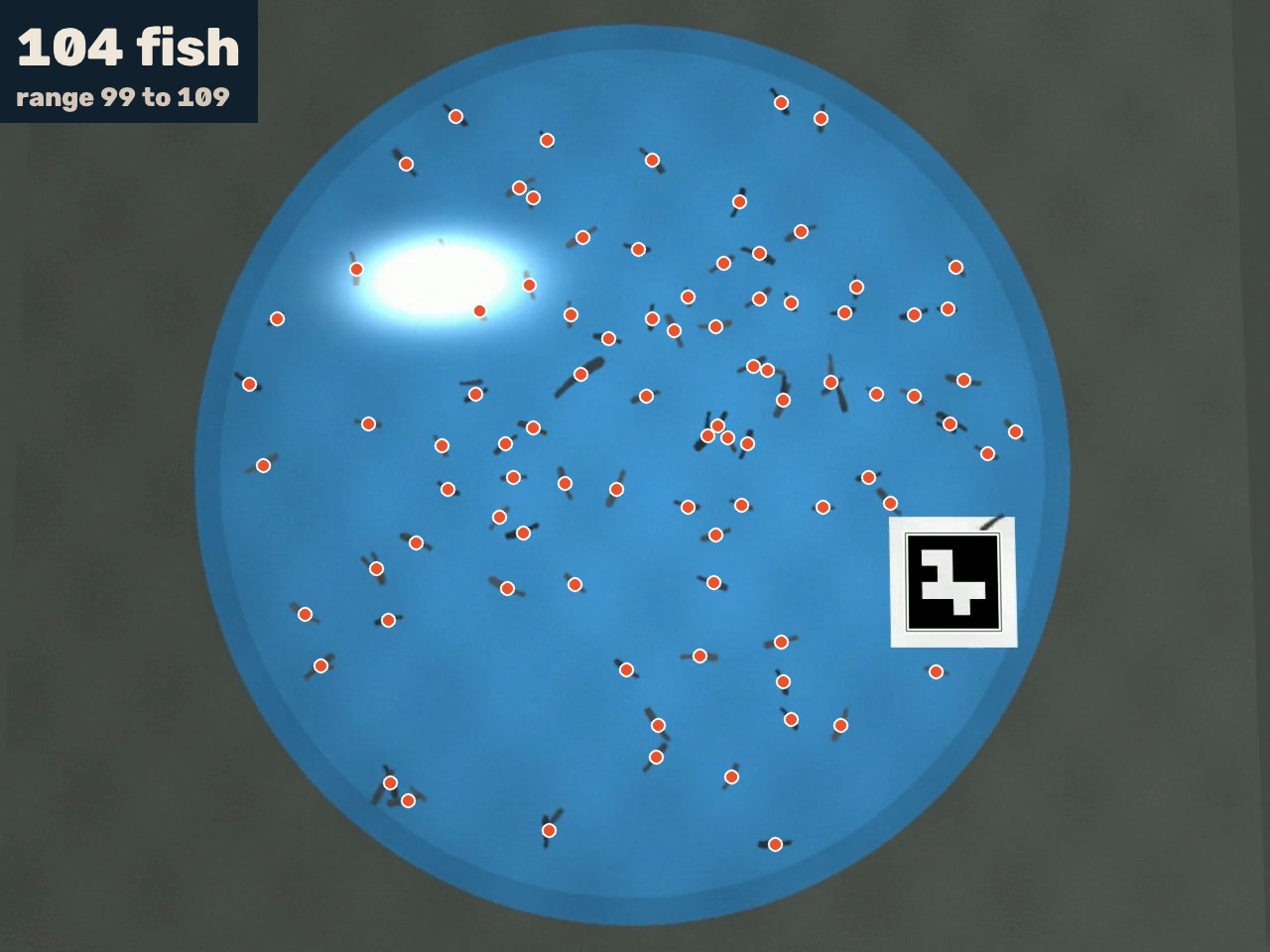
On each frame, Fincount AI finds the fish and marks each one with a coral dot. It also adds back fish it can tell are hidden under others. This is the frame it counted most clearly, with 88 dots on it.
Because the dots are drawn on the picture, you or a reviewer can check the count with your own eyes.
Dots on this frame
88
Every frame gives its own count
The same basin is counted once for every frame. The counts differ a little, because fish swim over each other and some are hidden in some frames.
In this run the counts ran from 99 to 108.
The frames are combined, then corrected
Hidden fish mean most frames undercount. So Fincount AI does not take the middle of the frame counts. It takes the 75th percentile, a number near the high end, then corrects it with a calibration made from basins where the true count is known.
We do not follow single fish from frame to frame, because fish swap places when they cross and a tracker would count some twice.
75th percentile
Count after correction
Method: per frame counts, 75th percentile, calibrated range.
The count comes with a range
The range is the span the true count falls in. It is set from basins that were counted by hand, so it is wider when the basin is crowded and narrower when it is clear.
This is why Fincount never shows a single number on its own.
Fish counted
104
Range to
Half the range is % of the count.
The simulator knows the true count of this basin: 100. Fincount counted 104, a difference of +4.
Is the basin too crowded?
Every size of fish has a limit on how many can be counted well in one basin. Fincount AI scores how crowded the basin is and compares it with the limit for the size group.
Above the limit it does not guess. It tells the worker to split the basin and film again.
Crowding score
Limit
Under the limit, so the count can be used.
Every clear fish is measured
Using the scale card, Fincount AI measures the length of every fish it can see clearly and completely, and corrects for the tilt of the phone. Fish that are partly hidden are left out, because a hidden tail would make a fish look short.
Fish measured
Average length
Smallest tenth to biggest tenth
Length becomes weight
Each length is turned into a weight with a curve fitted to the hatchery's own fish. The average weight is the average of the weights, never the weight of the average length, and it always comes as a range.
Average weight
Range
Whole basin
Until a hatchery weighs a group of its fish, the curve is a published default for African catfish.
The count is split into size groups
Finally the count is split into the hatchery's own size groups, using the measured lengths. A warning appears when a few fish are growing much faster than the rest, because they eat the small ones.
- Under 3 cm100
- 3 to 5 cm4
- 5 to 8 cm0
- Over 8 cm0
No fast growers were flagged in this basin.
Then a person looks, when it matters
Fincount AI flags a basin for review when the range is wide, the basin is too crowded, a picture check failed or no scale card was found. A reviewer then looks at the dots and can add or remove them before the count goes on a certificate.
Needs review in this run
No
The range was narrow enough, the basin was not too crowded, and every check passed.
The whole run took seconds.
Count your next basin with Fincount.
Film a basin, get the count, and send your buyer a count they can check. The first hatcheries get 30 days free.